
Cela uncedo
Cela uncedo ithumela ingxaki, umbuzo okanye ingcebiso kwiqela lenkxaso le-1map ngaphakathi kwi-app. Uxela okwenzekileyo nokuba kuchaphazela njani umsebenzi wakho. I-app yongeza iinkcukacha ezifunwa liqela lenkxaso, ibala ukuba kungxamisekile kangakanani ngokweempendulo zakho, ize ikuthumelele inombolo yesalathiso nge-imeyile.
Ayikho kwimenyu yakho?
Support appears once 1map has switched the support form on. Until then, e-mail 1map's support team as before.
Apho uyifumana khona
Choose Support: on the Dashboard, beside Profile, in the panel behind your avatar (top right), or under Help in the menu at the top (on a phone, the menu behind ☰). It opens your support page, with Ask for help and Send feedback at the top and your requests below. Ask for help opens the form over the page you are on, so the map you have open stays as it is; Send feedback opens it on a suggestion. Cancel brings you back to where you were on the support page; once a request is sent, the support page opens it.
A link straight to it: app.1map.co.za/support. If you are not signed in, you sign in first; then your support page opens over the Dashboard.
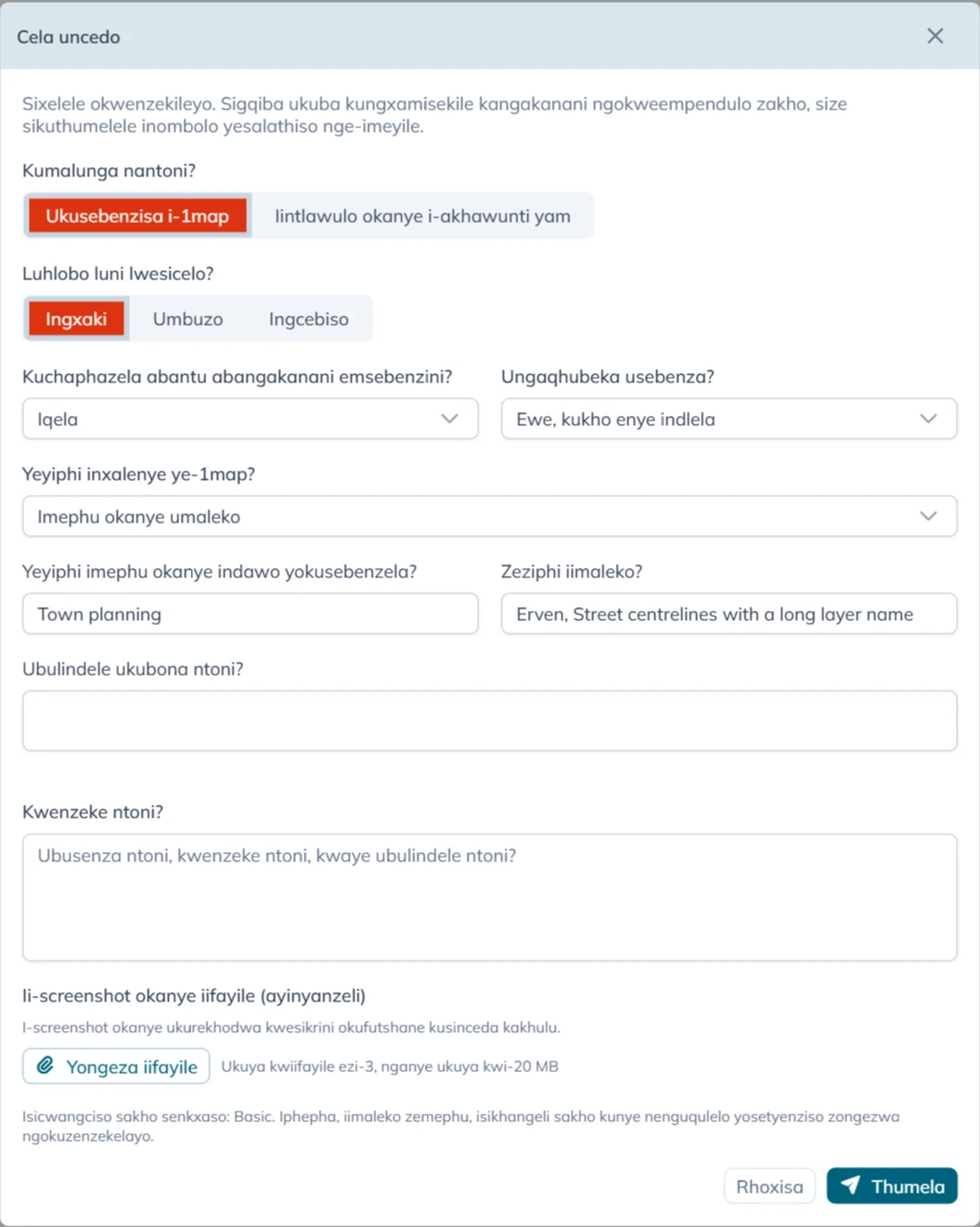
Ukuzalisa ifomu
Kumalunga nantoni? iza kuqala:
- Ukusebenzisa i-1map: nantoni na malunga ne-app, iimephu zayo, idatha yayo okanye ii-API zayo.
- Iintlawulo okanye i-akhawunti yam: ii-invoyisi, iintlawulo, isicwangciso sakho okanye iinkcukacha ze-akhawunti yakho. Jonga Imibuzo yeentlawulo neye-akhawunti.
Kwi-Ukusebenzisa i-1map ifomu ibuza:
| Umbuzo | Ukhetho lwakho |
|---|---|
| Luhlobo luni lwesicelo? | Ingxaki, Umbuzo, Ingcebiso okanye Compliment |
| Kuchaphazela abantu abangakanani emsebenzini? | Umbutho wonke, Isebe okanye indawo enye, Iqela okanye Umntu omnye |
| Ungaqhubeka usebenza? | Hayi, umsebenzi umile, Kancinci: enye indlela inzima kakhulu, Ewe, kukho enye indlela, Akukho mpembelelo ngoku okanye Andazi |
| Yeyiphi inxalenye ye-1map? | Imephu okanye umaleko, Ukufumana idilesi okanye indawo, I-API, Imephu efakiweyo (widget), Inkqubo yenye inkampani okanye Enye into |
For a Ingcebiso or a Compliment the form does not ask Kuchaphazela abantu abangakanani emsebenzini? or Ungaqhubeka usebenza?: it stops no one's work, so it is always P4. The box for your words is then called Your suggestion or What did you like?.
Inxalenye oyikhethayo izisa imibuzo embalwa yayo:
| Inxalenye | Imibuzo eyongezelelweyo |
|---|---|
| Imephu okanye umaleko | Yeyiphi imephu okanye indawo yokusebenzela? ne-Zeziphi iimaleko? (zombini zizaliswa ngokwemephu ovule yona; zitshintshe ukuba azichanekanga), ne-Ubulindele ukubona ntoni? |
| Ukufumana idilesi okanye indawo | Ubukhangela ntoni? |
| I-API | Yeyiphi i-API?, Isicelo senziwe nini?, Isicelo (ungafaki izitshixo neephasiwedi) ne-Impendulo okanye impazamo |
| Inkqubo yenye inkampani | Yeyiphi inkqubo? |
Kwenzeke ntoni? ihlala ifuneka: amagama ambalwa ubuncinane. Yitsho ukuba ubusenza ntoni, kwenzeke ntoni, nokuba ubulindele ntoni.
Yongeza iifayile ithatha ukuya kwiifayile ezi-3, nganye ukuya kwi-20 MB. I-screenshot okanye ukurekhodwa kwesikrini okufutshane kunceda iqela lenkxaso kakhulu. You can also paste a screenshot straight into the text box, or drop files on it: they are added here. The toolbar above the text makes it larger, bold, italic or underlined, and adds lists and links.
Emva koko cofa Thumela.
Kungxamisekile kangakanani
Awukhethi ukubaluleka. I-app iyakubala ngokweempendulo zakho kwi-Kuchaphazela abantu abangakanani emsebenzini? nakwi-Ungaqhubeka usebenza?, ngoko sonke isicelo silinganiswa ngendlela efanayo:
| Kuchaphazela abangakanani | Umsebenzi umile | Kancinci | Kukho enye indlela | Akukho mpembelelo ngoku | Andazi |
|---|---|---|---|---|---|
| Umbutho wonke | P1 | P1 | P2 | P3 | P2 |
| Isebe okanye indawo enye | P1 | P2 | P3 | P3 | P3 |
| Iqela | P2 | P3 | P3 | P4 | P3 |
| Umntu omnye | P3 | P3 | P4 | P4 | P4 |
P1 yeyona ingxamiseke kakhulu, kwaye P4 yeyona ingxamiseke kancinci. I-imeyile oyifumanayo ixela ukuba isicelo sakho sinokubaluleka okuphi, nokuba kuthetha ntoni.
Oko i-app ikongezelayo
Ukuze iqela lenkxaso lingabuzi, i-app ithumela ezi zinto nesicelo sakho. Izithatha xa uvula ifomu:
- idilesi yephepha obukulo (ngaphandle kwanto emva kwe-
?); - iimaleko ezibonakalayo emephini, nendawo yokusebenzela ovule yona;
- isikhangeli sakho, nenguqulelo ye-app;
- isicelo sokugqibela se-API esenziwe yi-app kwiseva ye-1map, nesokugqibela esisilele: kuphela uhlobo lwaso, idilesi yaso nesiphumo saso, hayi idatha ekuso;
- ixesha.
Igama lakho, idilesi ye-imeyile ne-akhawunti yakho kuhamba nesicelo, ukuze iqela lenkxaso lazi ukuba liphendula bani.
Emva kokuthumela
Ngokuqhelekileyo kwisithuba semizuzwana ifomu ithi Isicelo sakho sibhaliswe njenge-, kulandele isalathiso, umzekelo CS-1234. Kulandela i-imeyile ene:
- isalathiso: sikhankanye xa uqhagamshelana ne-1map ngesi sicelo;
- i-Support Plan yakho nokubaluleka, nomgca ochaza ukuba ukubaluleka kuthetha ntoni;
- umhla nexesha i-1map eya kuphendula ngalo, ngexesha laseMzantsi Afrika;
- nokuba isicwangciso sakho siyazibophelela na kwixesha lokusombulula ingxaki;
- ikopi yoko ukuthumeleyo.
Xa ideski yenkxaso ye-1map ingafikeleleki ngelo xesha, ifomu ithi Isicelo sakho sibhalisiwe. Inombolo yakho yesalathiso iza kulandela nge-imeyile. Isicelo sakho siyagcinwa, size sithunyelwe kwangoko xa ideski ifikeleleka, kwaye i-imeyile enesalathiso sakho ilandela ngoko. Musa ukusithumela kwakhona.
Ukucofa Thumela kabini, okanye xa unxibelelwano lucotha, akusibhalisi isicelo kabini: ukucofa kwesibini kwifomu efanayo kuyaqondwa. Ukubuza enye into, vala ifomu uze uyivule kwakhona.
When support answers, the answer comes by e-mail from 1map, with the same subject as the first e-mail and your reference in it. To answer back, reply to that e-mail and keep the reference in the subject.
Your requests
Your support page lists the requests you sent from the form, in the account you are signed in to. An account administrator sees every request of the account, with who asked. It opens on Open: every request not yet resolved, those waiting for your answer included. Waiting for you shows only those, Resolved the finished ones, and All everything. The search box finds a request by its reference, its words or who asked, and each column sorts and filters like any list in 1map.
Choose a request to read the conversation: what you wrote, the support team's replies (signed 1map Support, or with the name of who wrote it, as Rita Brown (1map Support)) and your own replies. Type your reply in the box at the bottom and press Send reply. The toolbar makes text bold, italic, underlined or larger, and adds lists and links; a web address you type becomes a link by itself. Add files sends up to 3 files of 20 MB with it: pick them, drop them on the box, or paste a screenshot straight into it. Your files show on your reply. When the team is waiting for your answer, the box shows what they asked, and your reply hands the request back to them. The top of a request shows when you asked, what it is about, and when the first reply is due or came. When a request is resolved, you get an e-mail saying so (or the support team's closing reply, if they wrote one). When a resolved request asks whether it is solved, Yes, it is solved closes it and No, it is not solved lets you reply; otherwise a resolved request takes no more replies: use Ask for help for a new one. A resolved request also closes by itself a few business days later, after a reminder by e-mail.
Files sent with the request lists the files you added. Choose a picture to see it on the page (Download keeps a copy); a PDF opens in a new tab, and any other file is saved to your device. A file still on its way to the support team shows Not available yet.
A request you e-mailed to [email protected] is answered by e-mail.
Izicwangciso zenkxaso namaxesha okuphendula
Ifomu ibonisa isicwangciso sakho ngaphezu kwe-Thumela (Isicwangciso sakho senkxaso: …):
| Support Plan | Ngubani onaso | I-1map iphendula kwisithuba se- |
|---|---|---|
| Basic | Abantu abakwisicwangciso se-1map esihlawulwayo | Iiyure zokusebenza ezili-16 (iintsuku ezimbini zokusebenza), nokuba kubaluleke kangakanani |
| Standard okanye Premium | Ii-akhawunti ezine-annexure yenkxaso esayiniweyo | P1 no-P2: iiyure zokusebenza ezi-4. P3: ezili-12. P4: ezingama-24 |
| Akukho | Izicwangciso zasimahla nezovavanyo, ezingenayo i-annexure | Akukho xesha lokuphendula lithenjisiweyo; i-1map isasijonga isicelo sakho |
Iiyure zokusebenza nguMvulo ukuya kuLwesihlanu, ukusuka ngo-08:00 ukuya ngo-13:00 nango-14:00 ukuya ngo-17:00 ngexesha laseMzantsi Afrika, ngaphandle kweeholide zikazwelonke. I-imeyile inika umhla nexesha lokwenyani, hayi inani leeyure.
Isicwangciso se-Basic asizibophelelanga kwixesha lokusombulula ingxaki. Nge-Standard okanye i-Premium, ixesha lokuyisombulula linjengoko libekwe kwi-annexure yakho yenkxaso. Ukulungiselela isicwangciso senkxaso, qhagamshelana ne-1map.
Imibuzo yeentlawulo neye-akhawunti
Khetha Iintlawulo okanye i-akhawunti yam, bhala umbuzo wakho phantsi kwe-Umbuzo wakho, yongeza iifayile ukuba ziyanceda (i-invoyisi, ubungqina bentlawulo), uze ucofe Thumela. Umbuzo uya nge-imeyile kwiqela lezezimali le-1map, kwaye ufumana ikopi. Ifomu ithi Umbuzo wakho uthunyelwe kwiqela lethu lezezimali, kwaye ufumene ikopi nge-imeyile. Iqela lezezimali likuphendula nge-imeyile.
Imibuzo yeentlawulo ayinako ukubaluleka okanye ixesha lokuphendula, kwaye ayiyi kwideski yenkxaso.