
Ask for help
Ask for help sends a problem, a question or a suggestion to 1map's support team from inside the app. You say what happened and how it affects your work. The app adds the details support needs, works out how urgent it is from your answers, and e-mails you a reference number.
Not in your menu?
Support appears once 1map has switched the support form on. Until then, e-mail 1map's support team as before.
Where to find it
Choose Support: on the Dashboard, beside Profile, in the panel behind your avatar (top right), or under Help in the menu at the top (on a phone, the menu behind ☰). It opens your support page, with Ask for help and Send feedback at the top and your requests below. Ask for help opens the form over the page you are on, so the map you have open stays as it is; Send feedback opens it on a suggestion. Cancel brings you back to where you were on the support page; once a request is sent, the support page opens it.
A link straight to it: app.1map.co.za/support. If you are not signed in, you sign in first; then your support page opens over the Dashboard.
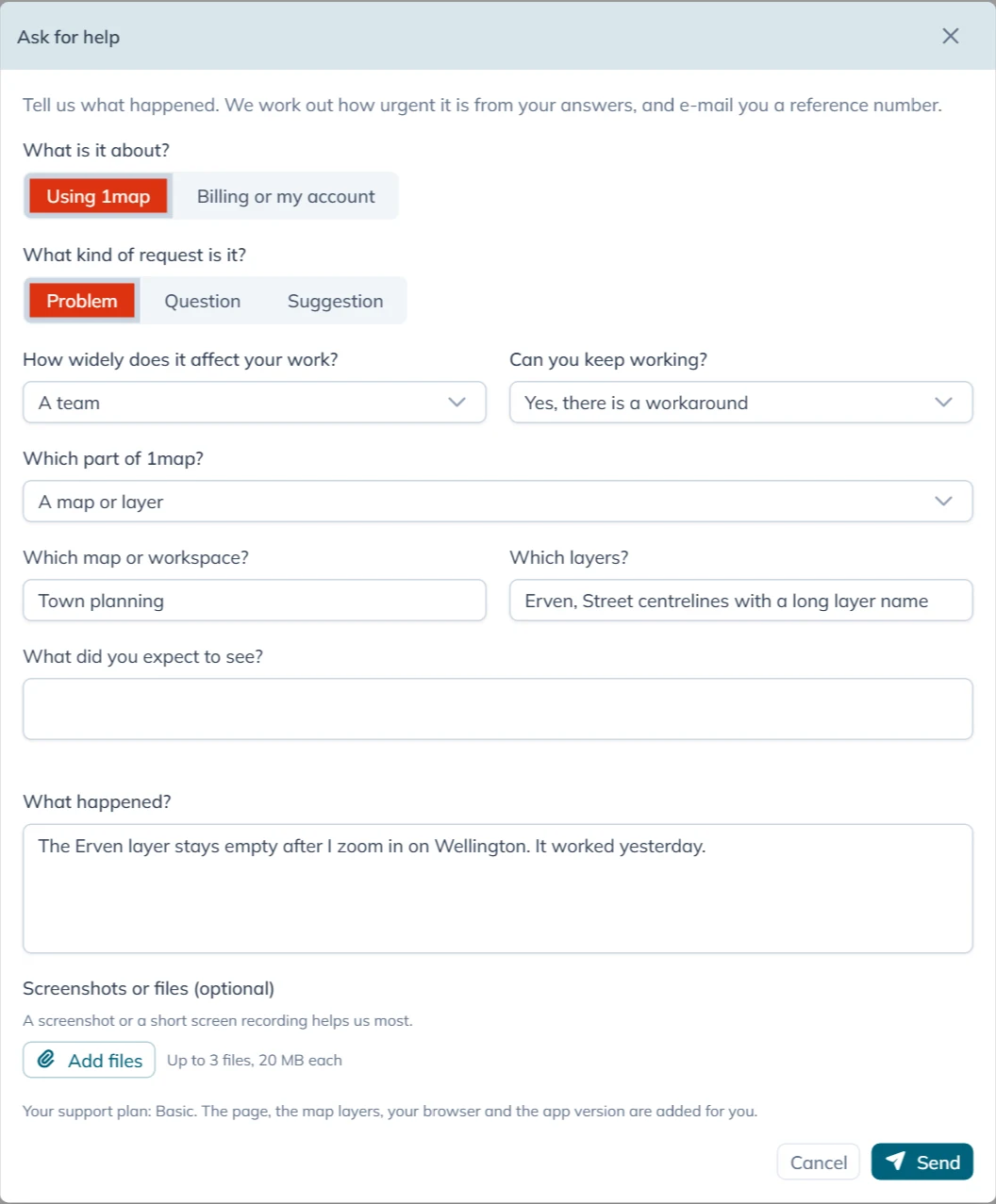
Filling in the form
What is it about? comes first:
- Using 1map: anything about the app, its maps, its data or its APIs.
- Billing or my account: invoices, payments, your plan or your account details. See Billing and account questions.
For Using 1map the form asks:
| Question | Your choices |
|---|---|
| What kind of request is it? | Problem, Question, Suggestion or Compliment |
| How widely does it affect your work? | The whole organisation, A department or site, A team or One person |
| Can you keep working? | No, work has stopped, Barely: the workaround is painful, Yes, there is a workaround, No immediate impact or Not sure |
| Which part of 1map? | A map or layer, Finding an address or premise, An API, The embedded map (widget), A third-party system or Something else |
For a Suggestion or a Compliment the form does not ask How widely does it affect your work? or Can you keep working?: it stops no one's work, so it is always P4. The box for your words is then called Your suggestion or What did you like?.
The part you choose brings a few questions of its own:
| Part | The extra questions |
|---|---|
| A map or layer | Which map or workspace? and Which layers? (both filled in from the map you have open; change them if they are wrong), and What did you expect to see? |
| Finding an address or premise | What did you search for? |
| An API | Which API?, When was the call made?, The request (leave out keys and passwords) and The response or error |
| A third-party system | Which system? |
What happened? is always needed: a few words at least. Say what you were doing, what happened, and what you expected.
Add files takes up to 3 files of 20 MB each. A screenshot or a short screen recording helps support most. You can also paste a screenshot straight into the text box, or drop files on it: they are added here. The toolbar above the text makes it larger, bold, italic or underlined, and adds lists and links.
Then press Send.
How urgent it is
There is no priority to choose. The app works it out from your answers to How widely does it affect your work? and Can you keep working?, so every request is weighed the same way:
| How widely | Work has stopped | Barely | There is a workaround | No immediate impact | Not sure |
|---|---|---|---|---|---|
| The whole organisation | P1 | P1 | P2 | P3 | P2 |
| A department or site | P1 | P2 | P3 | P3 | P3 |
| A team | P2 | P3 | P3 | P4 | P3 |
| One person | P3 | P3 | P4 | P4 | P4 |
P1 is the most urgent and P4 the least. The e-mail you get says which priority your request has and what it means.
What the app adds for you
So that support does not have to ask, the app sends these with your request. It takes them when you open the form:
- the address of the page you were on (without anything after a
?); - the layers visible on the map, and the workspace you have open;
- your browser, and the app's version;
- the last call the app made to 1map's server and the last one that failed: only the kind of call, its address and its result, never the data in it;
- the time.
Your name, e-mail address and account go with it, so support knows who to answer.
After you send
Usually within seconds the form says Your request is logged as followed by the reference, for example CS-1234. An e-mail follows with:
- the reference: quote it if you contact 1map about the request;
- your Support Plan and the priority, with a line on what the priority means;
- the date and time by which 1map will respond, in South African time;
- whether your plan commits to a time to resolve it;
- a copy of what you sent.
When 1map's support desk cannot be reached at that moment, the form says Your request is logged. Your reference number will follow by e-mail. Your request is kept and sent on as soon as the desk can be reached, and the e-mail with your reference follows then. Do not send it again.
Pressing Send twice, or on a slow connection, does not log the request twice: the second press of the same form is recognised. To ask something else, close the form and open it again.
When support answers, the answer comes by e-mail from 1map, with the same subject as the first e-mail and your reference in it. To answer back, reply to that e-mail and keep the reference in the subject.
Your requests
Your support page lists the requests you sent from the form, in the account you are signed in to. An account administrator sees every request of the account, with who asked. It opens on Open: every request not yet resolved, those waiting for your answer included. Waiting for you shows only those, Resolved the finished ones, and All everything. The search box finds a request by its reference, its words or who asked, and each column sorts and filters like any list in 1map.
Choose a request to read the conversation: what you wrote, the support team's replies (signed 1map Support, or with the name of who wrote it, as Rita Brown (1map Support)) and your own replies. Type your reply in the box at the bottom and press Send reply. The toolbar makes text bold, italic, underlined or larger, and adds lists and links; a web address you type becomes a link by itself. Add files sends up to 3 files of 20 MB with it: pick them, drop them on the box, or paste a screenshot straight into it. Your files show on your reply. When the team is waiting for your answer, the box shows what they asked, and your reply hands the request back to them. The top of a request shows when you asked, what it is about, and when the first reply is due or came. When a request is resolved, you get an e-mail saying so (or the support team's closing reply, if they wrote one). When a resolved request asks whether it is solved, Yes, it is solved closes it and No, it is not solved lets you reply; otherwise a resolved request takes no more replies: use Ask for help for a new one. A resolved request also closes by itself a few business days later, after a reminder by e-mail.
Files sent with the request lists the files you added. Choose a picture to see it on the page (Download keeps a copy); a PDF opens in a new tab, and any other file is saved to your device. A file still on its way to the support team shows Not available yet.
A request you e-mailed to [email protected] is answered by e-mail.
Support plans and response times
The form shows your plan above Send (Your support plan: …):
| Support Plan | Who has it | 1map responds within |
|---|---|---|
| Basic | People on a paid 1map plan | 16 business hours (two business days), whatever the priority |
| Standard or Premium | Accounts with a signed support annexure | P1 and P2: 4 business hours. P3: 12. P4: 24 |
| None | Free plans and trials, without an annexure | No response time is committed; 1map still looks at your request |
Business hours are Monday to Friday, 08:00 to 13:00 and 14:00 to 17:00 South African time, except public holidays. The e-mail gives the actual date and time, not a number of hours.
A Basic plan does not commit to a time to resolve the problem. With Standard or Premium, the time to resolve it is as your support annexure sets out. To arrange a support plan, contact 1map.
Billing and account questions
Choose Billing or my account, write your question under Your question, add files if they help (an invoice, a proof of payment), and press Send. The question goes by e-mail to 1map's accounts team, and you get a copy. The form says Your question has gone to our accounts team, and you have a copy by e-mail. The accounts team answers you by e-mail.
Billing questions have no priority or response time, and do not go to the support desk.