
Kgopela thušo
Kgopela thušo e romela bothata, potšišo goba tšhišinyo go sehlopha sa thušo sa 1map go tšwa ka gare ga app. O bolela seo se diregilego le ka moo se amago mošomo wa gago. App e tsenya dintlha tšeo sehlopha sa thušo se di nyakago, e bona go tšwa dikarabong tša gago gore se nyakega ka potlako go le kae, gomme e go romela nomoro ya referense ka imeile.
Ga e gona ka go menu ya gago?
Support appears once 1map has switched the support form on. Until then, e-mail 1map's support team as before.
Moo o e hwetšago gona
Choose Support: on the Dashboard, beside Profile, in the panel behind your avatar (top right), or under Help in the menu at the top (on a phone, the menu behind ☰). It opens your support page, with Ask for help and Send feedback at the top and your requests below. Ask for help opens the form over the page you are on, so the map you have open stays as it is; Send feedback opens it on a suggestion. Cancel brings you back to where you were on the support page; once a request is sent, the support page opens it.
A link straight to it: app.1map.co.za/support. If you are not signed in, you sign in first; then your support page opens over the Dashboard.
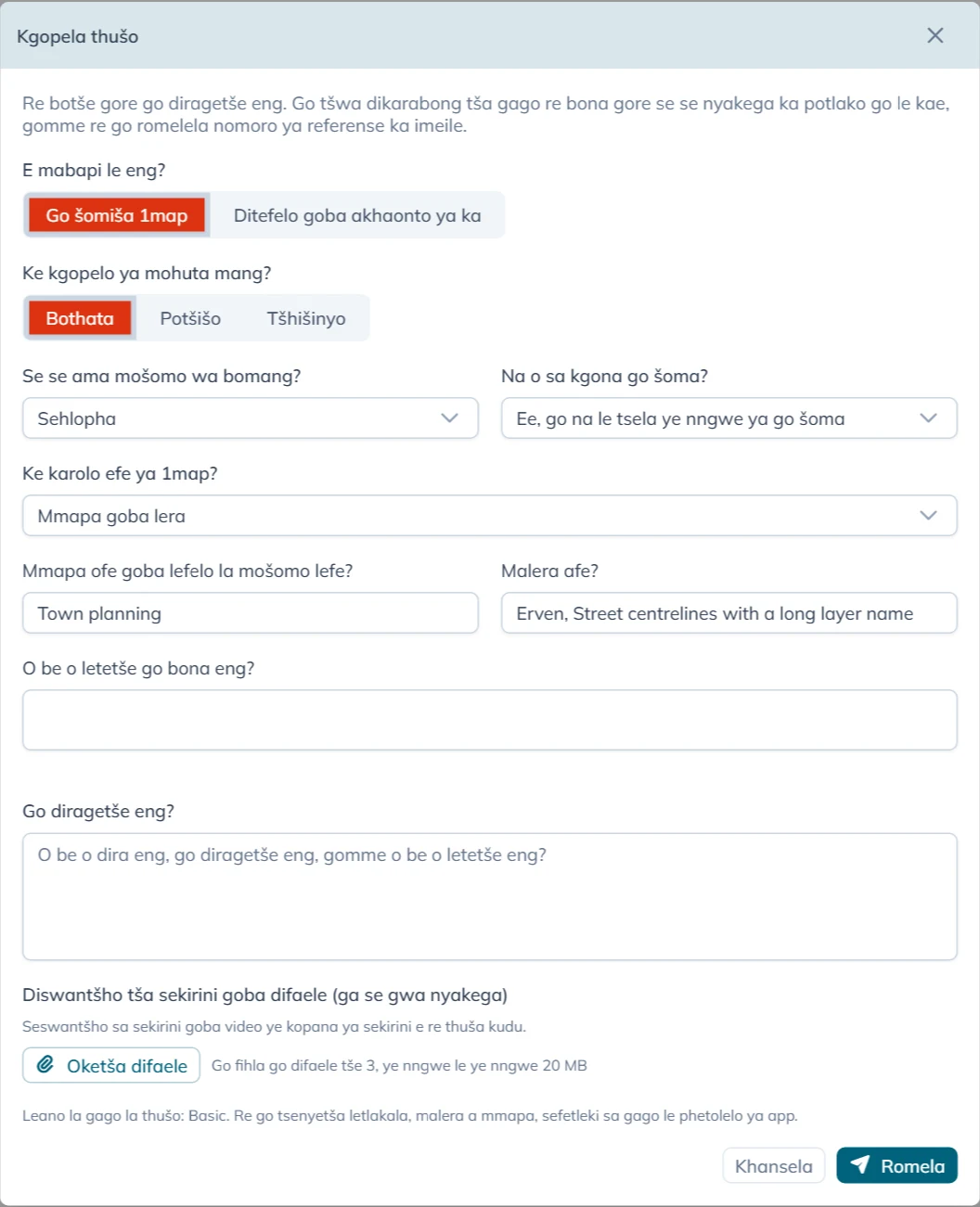
Go tlatša foromo
E mabapi le eng? e tla pele:
- Go šomiša 1map: se sengwe le se sengwe mabapi le app, dimmapa tša yona, datha ya yona goba di-API tša yona.
- Ditefelo goba akhaonto ya ka: di-invoice, ditefelo, leano la gago goba dintlha tša akhaonto ya gago. Bona Dipotšišo tša ditefelo le tša akhaonto.
Bakeng sa Go šomiša 1map foromo e botšiša:
| Potšišo | Dikgetho tša gago |
|---|---|
| Ke kgopelo ya mohuta mang? | Bothata, Potšišo, Tšhišinyo goba Compliment |
| Se se ama mošomo wa bomang? | Mokgatlo ka moka, Lefapha goba lekala, Sehlopha goba Motho o tee |
| Na o sa kgona go šoma? | Aowa, mošomo o emile, Ka bothata: tsela ye nngwe ya go šoma e a tshwenya kudu, Ee, go na le tsela ye nngwe ya go šoma, Ga go seo se amegago gona bjale goba Ga ke tsebe |
| Ke karolo efe ya 1map? | Mmapa goba lera, Go nyaka aterese goba lefelo, API, Mmapa wo o tsentšwego weposaeteng (widget), Tshepedišo ya mokgatlo wa boraro goba Se sengwe |
For a Tšhišinyo or a Compliment the form does not ask Se se ama mošomo wa bomang? or Na o sa kgona go šoma?: it stops no one's work, so it is always P4. The box for your words is then called Your suggestion or What did you like?.
Karolo yeo o e kgethago e tliša dipotšišo tše mmalwa tša yona:
| Karolo | Dipotšišo tše di oketšegilego |
|---|---|
| Mmapa goba lera | Mmapa ofe goba lefelo la mošomo lefe? le Malera afe? (ka bobedi di tladitšwe go tšwa mmapeng wo o o butšego; di fetole ge di fošagetše), le O be o letetše go bona eng? |
| Go nyaka aterese goba lefelo | O nyakile eng? |
| API | API efe?, Pitšo e dirilwe neng?, Kgopelo (o se tsenye dinotlelo le diphasewete) le Karabo goba phošo |
| Tshepedišo ya mokgatlo wa boraro | Tshepedišo efe? |
Go diragetše eng? e dula e nyakega: bonyane mantšu a mmalwa. Bolela seo o bego o se dira, seo se diregilego, le seo o bego o se letetše.
Oketša difaele e amogela go fihla go difaele tše 3, ye nngwe le ye nngwe 20 MB. Seswantšho sa sekirini goba video ye kopana ya sekirini e thuša sehlopha sa thušo kudu. You can also paste a screenshot straight into the text box, or drop files on it: they are added here. The toolbar above the text makes it larger, bold, italic or underlined, and adds lists and links.
Ke moka gatelela Romela.
Se nyakega ka potlako go le kae
Ga o kgethe bohlokwa (priority). App e bo bona go tšwa dikarabong tša gago go Se se ama mošomo wa bomang? le Na o sa kgona go šoma?, ka fao kgopelo ye nngwe le ye nngwe e lekanyetšwa ka tsela ye tee:
| Se ama bomang | Mošomo o emile | Ka bothata | Go na le tsela ye nngwe ya go šoma | Ga go seo se amegago gona bjale | Ga ke tsebe |
|---|---|---|---|---|---|
| Mokgatlo ka moka | P1 | P1 | P2 | P3 | P2 |
| Lefapha goba lekala | P1 | P2 | P3 | P3 | P3 |
| Sehlopha | P2 | P3 | P3 | P4 | P3 |
| Motho o tee | P3 | P3 | P4 | P4 | P4 |
P1 ke yona ye e nyakegago ka potlako kudu, gomme P4 ke yona ye e nyakegago ka potlako ka mo go nyenyane. Imeile yeo o e hwetšago e bolela gore kgopelo ya gago e na le bohlokwa bofe le gore bo ra eng.
Seo app e go tsenyetšago sona
Gore sehlopha sa thušo se se swanele go botšiša, app e romela tše le kgopelo ya gago. E di tšea ge o bula foromo:
- aterese ya letlakala leo o bego o le go lona (ntle le se sengwe le se sengwe ka morago ga
?); - malera ao a bonalago mmapeng, le lefelo la mošomo leo o le butšego;
- sefetleki sa gago, le phetolelo ya app;
- pitšo ya mafelelo yeo app e e dirilego go seva ya 1map le ya mafelelo yeo e paletšwego: fela mohuta wa pitšo, aterese ya yona le dipoelo tša yona, e sego datha ye e lego ka gare ga yona;
- nako.
Leina la gago, aterese ya imeile le akhaonto di ya le yona, gore sehlopha sa thušo se tsebe gore se arabe mang.
Ka morago ga go romela
Gantši ka gare ga metsotswana foromo e re Kgopelo ya gago e ngwadilwe bjalo ka, gwa latela referense, mohlala CS-1234. Imeile e a latela, e na le:
- referense: e bolele ge o ikgokaganya le 1map mabapi le kgopelo;
- leano la gago la thušo (Support Plan) le bohlokwa, le mothaladi wo o hlalošago seo bohlokwa bo se rago;
- letšatšikgwedi le nako yeo 1map e tla araba pele ga yona, ka nako ya Afrika Borwa;
- ge eba leano la gago le tshepiša nako ya go rarolla bothata;
- kopi ya seo o se rometšego.
Ge thušo ya badiriši ya 1map e sa fihlelelwe ka nako yeo, foromo e re Kgopelo ya gago e ngwadilwe. Nomoro ya gago ya referense e tla latela ka imeile. Kgopelo ya gago e a bolokwa gomme e romelwa gateetee ge thušo ya badiriši e fihlelelwa, gomme imeile ye e nago le referense ya gago e latela ka nako yeo. O se e romele gape.
Go gatelela Romela gabedi, goba ka kgokagano ye e nanyago, ga go ngwale kgopelo gabedi: go gatelela ga bobedi ga foromo ye tee go a lemogwa. Go botšiša se sengwe, tswalela foromo gomme o e bule gape.
When support answers, the answer comes by e-mail from 1map, with the same subject as the first e-mail and your reference in it. To answer back, reply to that e-mail and keep the reference in the subject.
Your requests
Your support page lists the requests you sent from the form, in the account you are signed in to. An account administrator sees every request of the account, with who asked. It opens on Open: every request not yet resolved, those waiting for your answer included. Waiting for you shows only those, Resolved the finished ones, and All everything. The search box finds a request by its reference, its words or who asked, and each column sorts and filters like any list in 1map.
Choose a request to read the conversation: what you wrote, the support team's replies (signed 1map Support, or with the name of who wrote it, as Rita Brown (1map Support)) and your own replies. Type your reply in the box at the bottom and press Send reply. The toolbar makes text bold, italic, underlined or larger, and adds lists and links; a web address you type becomes a link by itself. Add files sends up to 3 files of 20 MB with it: pick them, drop them on the box, or paste a screenshot straight into it. Your files show on your reply. When the team is waiting for your answer, the box shows what they asked, and your reply hands the request back to them. The top of a request shows when you asked, what it is about, and when the first reply is due or came. When a request is resolved, you get an e-mail saying so (or the support team's closing reply, if they wrote one). When a resolved request asks whether it is solved, Yes, it is solved closes it and No, it is not solved lets you reply; otherwise a resolved request takes no more replies: use Ask for help for a new one. A resolved request also closes by itself a few business days later, after a reminder by e-mail.
Files sent with the request lists the files you added. Choose a picture to see it on the page (Download keeps a copy); a PDF opens in a new tab, and any other file is saved to your device. A file still on its way to the support team shows Not available yet.
A request you e-mailed to [email protected] is answered by e-mail.
Maano a thušo le dinako tša karabo
Foromo e bontšha leano la gago godimo ga Romela (Leano la gago la thušo: …):
| Support Plan | Yo a nago le lona | 1map e araba ka gare ga |
|---|---|---|
| Basic | Batho ba ba lego leanong la 1map leo le lefelwago | Diiri tša kgwebo tše 16 (matšatši a mabedi a kgwebo), go sa šetšwe bohlokwa |
| Standard goba Premium | Diakhaonto tšeo di nago le annexure ya thušo ye e saennwego | P1 le P2: diiri tša kgwebo tše 4. P3: 12. P4: 24 |
| Ga go selo | Maano a mahala le diteko, ntle le annexure | Ga go nako ya karabo yeo e tshepišwago; 1map e sa lebelela kgopelo ya gago |
Diiri tša kgwebo ke Mošupologo go fihla Labohlano, 08:00 go fihla 13:00 le 14:00 go fihla 17:00 ka nako ya Afrika Borwa, ntle le matšatši a maikhutšo a setšhaba. Imeile e fa letšatšikgwedi le nako ya nnete, e sego palo ya diiri.
Leano la Basic ga le tshepiše nako ya go rarolla bothata. Ka Standard goba Premium, nako ya go bo rarolla e bjalo ka ge annexure ya gago ya thušo e e beile. Go beakanya leano la thušo, ikgokaganye le 1map.
Dipotšišo tša ditefelo le tša akhaonto
Kgetha Ditefelo goba akhaonto ya ka, ngwala potšišo ya gago ka tlase ga Potšišo ya gago, oketša difaele ge di thuša (invoice, bohlatse bja tefelo), gomme o gatelele Romela. Potšišo e romelwa ka imeile go sehlopha sa ditšhelete sa 1map, gomme o hwetša kopi. Foromo e re Potšišo ya gago e rometšwe go sehlopha sa rena sa ditšhelete, gomme o na le kopi ka imeile. Sehlopha sa ditšhelete se go araba ka imeile.
Dipotšišo tša ditefelo ga di abelwe bohlokwa (priority) goba nako ya karabo, gomme ga di ye go thušo ya badiriši.