
Kopa thuso
Kopa thuso e romela bothata, potso kgotsa tshitshinyo kwa setlhopheng sa tshegetso sa 1map go tswa mo teng ga app. O bolela se se diragetseng le ka moo se amang tiro ya gago ka teng. App e tsenya dintlha tse tshegetso e di tlhokang, e bona gore go potlakile go le kana kang go tswa mo dikarabong tsa gago, mme e go romelela nomoro ya referense ka imeile.
Ga e yo mo lenaneong la gago?
Support appears once 1map has switched the support form on. Until then, e-mail 1map's support team as before.
Kwa o e bonang teng
Choose Support: on the Dashboard, beside Profile, in the panel behind your avatar (top right), or under Help in the menu at the top (on a phone, the menu behind ☰). It opens your support page, with Ask for help and Send feedback at the top and your requests below. Ask for help opens the form over the page you are on, so the map you have open stays as it is; Send feedback opens it on a suggestion. Cancel brings you back to where you were on the support page; once a request is sent, the support page opens it.
A link straight to it: app.1map.co.za/support. If you are not signed in, you sign in first; then your support page opens over the Dashboard.
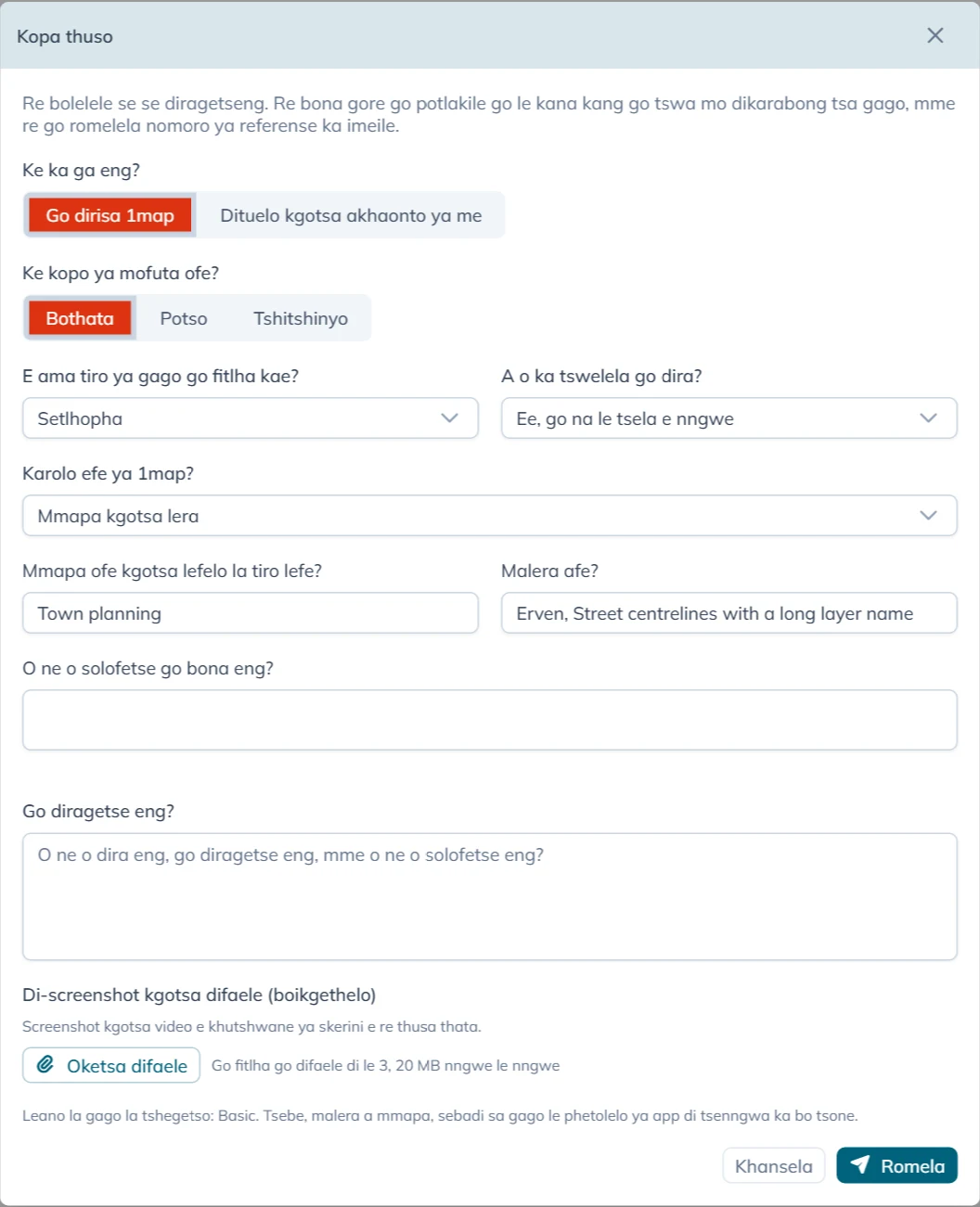
Go tlatsa foromo
Ke ka ga eng? e tla pele:
- Go dirisa 1map: sengwe le sengwe ka ga app, dimmapa tsa yone, data ya yone kgotsa di-API tsa yone.
- Dituelo kgotsa akhaonto ya me: di-invoice, dituelo, leano la gago kgotsa dintlha tsa akhaonto ya gago. Bona Dipotso tsa dituelo le tsa akhaonto.
Bakeng sa Go dirisa 1map foromo e botsa:
| Potso | Ditlhopho tsa gago |
|---|---|
| Ke kopo ya mofuta ofe? | Bothata, Potso, Tshitshinyo kgotsa Compliment |
| E ama tiro ya gago go fitlha kae? | Mokgatlho otlhe, Lefapha kgotsa lefelo, Setlhopha kgotsa Motho a le mongwe |
| A o ka tswelela go dira? | Nnyaa, tiro e emile, Ka bokete: tsela e nngwe e thata thata, Ee, go na le tsela e nngwe, Ga e ame tiro jaanong kgotsa Ga ke itse |
| Karolo efe ya 1map? | Mmapa kgotsa lera, Go bona aterese kgotsa lefelo, API, Mmapa o o tsentsweng (widget), Tsamaiso ya batho ba bangwe kgotsa Sengwe se sele |
For a Tshitshinyo or a Compliment the form does not ask E ama tiro ya gago go fitlha kae? or A o ka tswelela go dira?: it stops no one's work, so it is always P4. The box for your words is then called Your suggestion or What did you like?.
Karolo e o e tlhophang e tlisa dipotso di le mmalwa tsa yone:
| Karolo | Dipotso tse di oketsegileng |
|---|---|
| Mmapa kgotsa lera | Mmapa ofe kgotsa lefelo la tiro lefe? le Malera afe? (tsoopedi di tladiwa go tswa mo mmapeng o o o buleng; di fetole fa di sa siama), le O ne o solofetse go bona eng? |
| Go bona aterese kgotsa lefelo | O ne o batla eng? |
| API | API efe?, Kopo e dirilwe leng?, Kopo (o se ka wa tsenya dinotlolo le mafoko a sephiri) le Karabo kgotsa phoso |
| Tsamaiso ya batho ba bangwe | Tsamaiso efe? |
Go diragetse eng? e tlhokega ka metlha: bonnye mafoko a se kae. Bolela se o neng o se dira, se se diragetseng, le se o neng o se solofetse.
Oketsa difaele e tsaya go fitlha go difaele di le 3 tsa 20 MB nngwe le nngwe. Screenshot kgotsa video e khutshwane ya skerini e thusa tshegetso thata. You can also paste a screenshot straight into the text box, or drop files on it: they are added here. The toolbar above the text makes it larger, bold, italic or underlined, and adds lists and links.
Morago o tobetse Romela.
Go potlakile go le kana kang
Ga go na maemo a botlhokwa a o a tlhophang. App e a bona go tswa mo dikarabong tsa gago go E ama tiro ya gago go fitlha kae? le A o ka tswelela go dira?, ka jalo kopo nngwe le nngwe e lekanyediwa ka tsela e e tshwanang:
| Go fitlha kae | Tiro e emile | Ka bokete | Go na le tsela e nngwe | Ga e ame tiro jaanong | Ga ke itse |
|---|---|---|---|---|---|
| Mokgatlho otlhe | P1 | P1 | P2 | P3 | P2 |
| Lefapha kgotsa lefelo | P1 | P2 | P3 | P3 | P3 |
| Setlhopha | P2 | P3 | P3 | P4 | P3 |
| Motho a le mongwe | P3 | P3 | P4 | P4 | P4 |
P1 ke yone e e potlakileng go gaisa, mme P4 ke yone e e potlakileng go le gonnye go gaisa. Imeile e o e amogelang e bolela maemo a botlhokwa a kopo ya gago le se a se rayang.
Se app e go tsenyetsang sone
Gore tshegetso e se ka ya tshwanela go botsa, app e romela tse le kopo ya gago. E di tsaya fa o bula foromo:
- aterese ya tsebe e o neng o le mo go yone (kwa ntle ga sepe se se morago ga
?); - malera a a bonalang mo mmapeng, le lefelo la tiro le o le buleng;
- sebadi sa gago, le phetolelo ya app;
- kopo ya bofelo e app e e dirileng kwa seva ya 1map le ya bofelo e e paletsweng: mofuta wa kopo fela, aterese ya yone le dipoelo tsa yone, e seng data e e mo go yone;
- nako.
Leina la gago, aterese ya imeile le akhaonto di ya le yone, gore tshegetso e itse gore e arabe mang.
Morago ga go romela
Gantsi mo metsotswaneng e le mmalwa foromo e re Kopo ya gago e kwadisitswe jaaka e latelwa ke referense, sekai CS-1234. Imeile e latela, e e nang le:
- referense: e nopole fa o ikgolaganya le 1map ka ga kopo;
- leano la gago la tshegetso (Support Plan) le maemo a botlhokwa, le mola o o tlhalosang se maemo a botlhokwa a se rayang;
- letlha le nako e 1map e tla araba pele ga yone, ka nako ya Aforika Borwa;
- gore a leano la gago le solofetsa nako ya go e rarabolola;
- kopi ya se o se rometseng.
Fa deske ya tshegetso ya 1map e sa fitlhelelwe ka nako eo, foromo e re Kopo ya gago e kwadisitswe. Nomoro ya gago ya referense e tla latela ka imeile. Kopo ya gago e a bolokwa mme e romelwa ka bonako fa deske e fitlhelelwa, mme imeile e e nang le referense ya gago e latela ka nako eo. O se ka wa e romela gape.
Go tobetsa Romela gabedi, kgotsa mo kgolaganong e e bonya, ga go kwadise kopo gabedi: go tobetsa ga bobedi ga foromo e le nngwe go a lemogwa. Go botsa sengwe se sele, tswala foromo mme o e bule gape.
When support answers, the answer comes by e-mail from 1map, with the same subject as the first e-mail and your reference in it. To answer back, reply to that e-mail and keep the reference in the subject.
Your requests
Your support page lists the requests you sent from the form, in the account you are signed in to. An account administrator sees every request of the account, with who asked. It opens on Open: every request not yet resolved, those waiting for your answer included. Waiting for you shows only those, Resolved the finished ones, and All everything. The search box finds a request by its reference, its words or who asked, and each column sorts and filters like any list in 1map.
Choose a request to read the conversation: what you wrote, the support team's replies (signed 1map Support, or with the name of who wrote it, as Rita Brown (1map Support)) and your own replies. Type your reply in the box at the bottom and press Send reply. The toolbar makes text bold, italic, underlined or larger, and adds lists and links; a web address you type becomes a link by itself. Add files sends up to 3 files of 20 MB with it: pick them, drop them on the box, or paste a screenshot straight into it. Your files show on your reply. When the team is waiting for your answer, the box shows what they asked, and your reply hands the request back to them. The top of a request shows when you asked, what it is about, and when the first reply is due or came. When a request is resolved, you get an e-mail saying so (or the support team's closing reply, if they wrote one). When a resolved request asks whether it is solved, Yes, it is solved closes it and No, it is not solved lets you reply; otherwise a resolved request takes no more replies: use Ask for help for a new one. A resolved request also closes by itself a few business days later, after a reminder by e-mail.
Files sent with the request lists the files you added. Choose a picture to see it on the page (Download keeps a copy); a PDF opens in a new tab, and any other file is saved to your device. A file still on its way to the support team shows Not available yet.
A request you e-mailed to [email protected] is answered by e-mail.
Maano a tshegetso le dinako tsa karabo
Foromo e bontsha leano la gago fa godimo ga Romela (Leano la gago la tshegetso: …):
| Support Plan | Ba ba nang le lone | 1map e araba mo teng ga |
|---|---|---|
| Basic | Batho ba ba mo leanong la 1map le le duelelwang | Diura tsa tiro di le 16 (malatsi a mabedi a tiro), go sa kgathalesege maemo a botlhokwa |
| Standard kgotsa Premium | Diakhaonto tse di nang le annexure ya tshegetso e e saenilweng | P1 le P2: diura tsa tiro di le 4. P3: 12. P4: 24 |
| Sepe | Maano a mahala le a teko, kwa ntle ga annexure | Ga go na nako ya karabo e e solofeditsweng; 1map e santse e leba kopo ya gago |
Diura tsa tiro ke Mosupologo go fitlha Labotlhano, 08:00 go fitlha 13:00 le 14:00 go fitlha 17:00 ka nako ya Aforika Borwa, kwa ntle ga malatsi a boikhutso a setšhaba. Imeile e naya letlha le nako ya nnete, e seng palo ya diura.
Leano la Basic ga le solofetse nako ya go rarabolola bothata. Ka Standard kgotsa Premium, nako ya go bo rarabolola e jaaka annexure ya gago ya tshegetso e e tlhalosa. Go rulaganya leano la tshegetso, ikgolaganye le 1map.
Dipotso tsa dituelo le tsa akhaonto
Tlhopha Dituelo kgotsa akhaonto ya me, kwala potso ya gago ka fa tlase ga Potso ya gago, oketsa difaele fa di thusa (invoice, bosupi jwa tuelo), mme o tobetse Romela. Potso e ya ka imeile kwa setlhopheng sa diakhaonto sa 1map, mme o bona kopi. Foromo e re Potso ya gago e ile kwa setlhopheng sa rona sa diakhaonto, mme o na le kopi ka imeile. Setlhopha sa diakhaonto se go araba ka imeile.
Dipotso tsa dituelo ga di na maemo a botlhokwa kgotsa nako ya karabo, e bile ga di ye kwa deskeng ya tshegetso.