
Kopa thuso
Kopa thuso e romela bothata, potso kapa tlhahiso ho sehlopha sa tshehetso sa 1map ho tswa ka hare ho app. O bolela se etsahetseng le kamoo se amang mosebetsi wa hao kateng. App e kenya dintlha tseo tshehetso e di hlokang, e bona hore na ho potlaka hakae ho tswa dikarabong tsa hao, mme e o romella nomoro ya referense ka imeile.
Ha e yo lenaneng la hao?
Support appears once 1map has switched the support form on. Until then, e-mail 1map's support team as before.
Moo o e fumanang teng
Choose Support: on the Dashboard, beside Profile, in the panel behind your avatar (top right), or under Help in the menu at the top (on a phone, the menu behind ☰). It opens your support page, with Ask for help and Send feedback at the top and your requests below. Ask for help opens the form over the page you are on, so the map you have open stays as it is; Send feedback opens it on a suggestion. Cancel brings you back to where you were on the support page; once a request is sent, the support page opens it.
A link straight to it: app.1map.co.za/support. If you are not signed in, you sign in first; then your support page opens over the Dashboard.
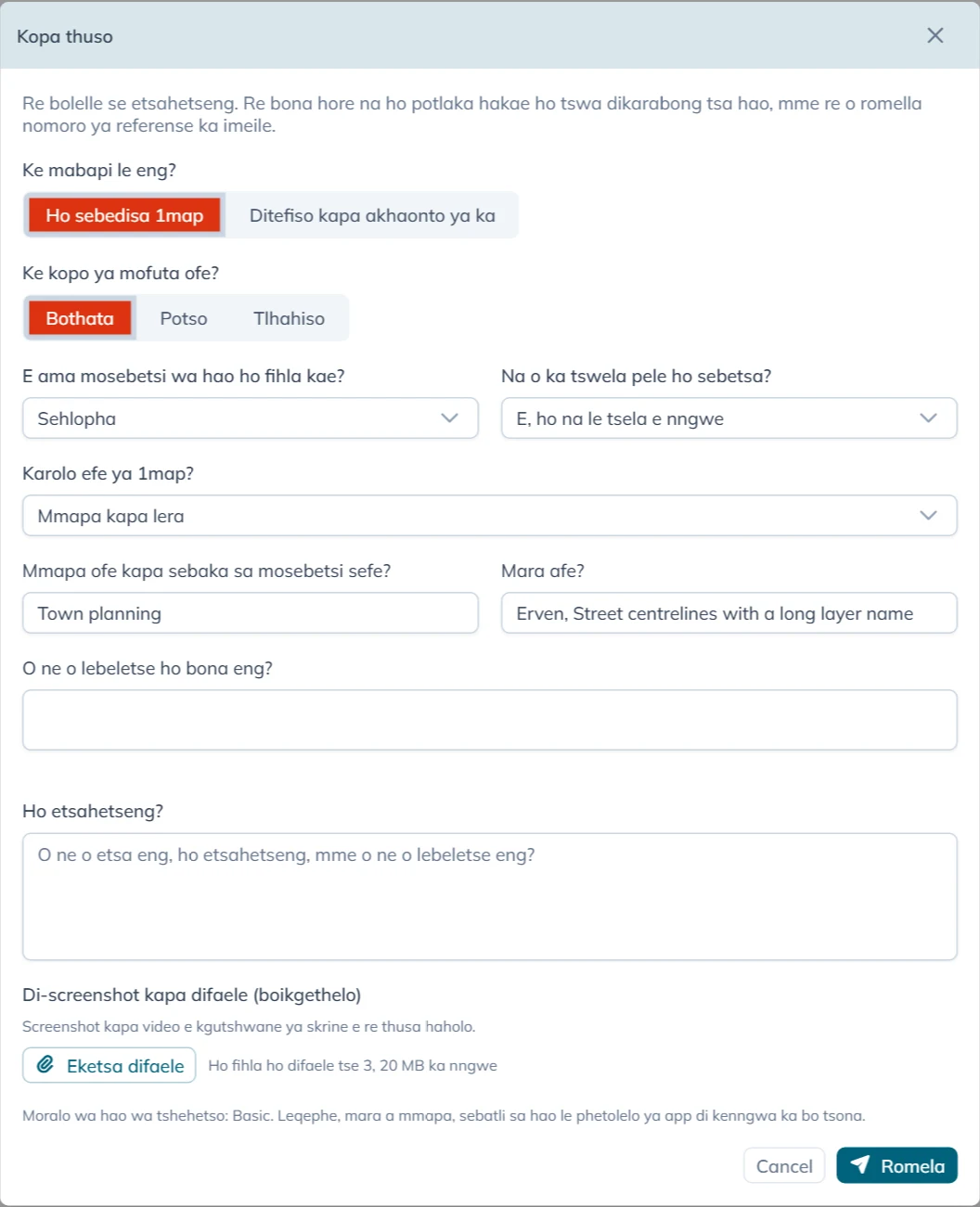
Ho tlatsa foromo
Ke mabapi le eng? e tla pele:
- Ho sebedisa 1map: ntho efe kapa efe e mabapi le app, dimmapa tsa yona, data ya yona kapa di-API tsa yona.
- Ditefiso kapa akhaonto ya ka: di-invoice, ditefo, moralo wa hao kapa dintlha tsa akhaonto ya hao. Sheba Dipotso tsa ditefiso le tsa akhaonto.
Bakeng sa Ho sebedisa 1map foromo e botsa:
| Potso | Dikgetho tsa hao |
|---|---|
| Ke kopo ya mofuta ofe? | Bothata, Potso, Tlhahiso kapa Compliment |
| E ama mosebetsi wa hao ho fihla kae? | Mokgatlo wohle, Lefapha kapa sebaka, Sehlopha kapa Motho a le mong |
| Na o ka tswela pele ho sebetsa? | Tjhe, mosebetsi o emile, Ka thata: tsela e nngwe e boima haholo, E, ho na le tsela e nngwe, Ha e ame mosebetsi hona jwale kapa Ha ke tsebe |
| Karolo efe ya 1map? | Mmapa kapa lera, Ho fumana aterese kapa sebaka, API, Mmapa o kentsweng (widget), Tsamaiso ya batho ba bang kapa Ntho e nngwe |
For a Tlhahiso or a Compliment the form does not ask E ama mosebetsi wa hao ho fihla kae? or Na o ka tswela pele ho sebetsa?: it stops no one's work, so it is always P4. The box for your words is then called Your suggestion or What did you like?.
Karolo eo o e kgethang e tlisa dipotso tse mmalwa tsa yona:
| Karolo | Dipotso tse eketsehileng |
|---|---|
| Mmapa kapa lera | Mmapa ofe kapa sebaka sa mosebetsi sefe? le Mara afe? (ka bobedi di tlatswa ho tswa mmapeng oo o o butseng; di fetole haeba di fosahetse), le O ne o lebeletse ho bona eng? |
| Ho fumana aterese kapa sebaka | O ne o batla eng? |
| API | API efe?, Kopo e entswe neng?, Kopo (o se ke wa kenya dinotlolo le diphasewete) le Karabo kapa phoso |
| Tsamaiso ya batho ba bang | Tsamaiso efe? |
Ho etsahetseng? e hlokahala kamehla: bonyane mantswe a mmalwa. Bolela seo o neng o se etsa, se etsahetseng, le seo o neng o se lebeletse.
Eketsa difaele e nka ho fihla ho difaele tse 3 tsa 20 MB ka nngwe. Screenshot kapa video e kgutshwane ya skrine e thusa tshehetso haholo. You can also paste a screenshot straight into the text box, or drop files on it: they are added here. The toolbar above the text makes it larger, bold, italic or underlined, and adds lists and links.
Ebe o tobetsa Romela.
Ho potlaka hakae
Ha ho boemo ba bohlokwa boo o bo kgethang. App e bo bona ho tswa dikarabong tsa hao ho E ama mosebetsi wa hao ho fihla kae? le Na o ka tswela pele ho sebetsa?, kahoo kopo e nngwe le e nngwe e lekanyetswa ka tsela e tshwanang:
| Ho fihla kae | Mosebetsi o emile | Ka thata | Ho na le tsela e nngwe | Ha e ame mosebetsi hona jwale | Ha ke tsebe |
|---|---|---|---|---|---|
| Mokgatlo wohle | P1 | P1 | P2 | P3 | P2 |
| Lefapha kapa sebaka | P1 | P2 | P3 | P3 | P3 |
| Sehlopha | P2 | P3 | P3 | P4 | P3 |
| Motho a le mong | P3 | P3 | P4 | P4 | P4 |
P1 ke yona e potlakang ka ho fetisisa, mme P4 ke yona e potlakang hanyane ka ho fetisisa. Imeile eo o e fumanang e bolela boemo ba bohlokwa ba kopo ya hao le seo bo se bolelang.
Seo app e o kenyetsang sona
E le hore tshehetso e se ke ya tlameha ho botsa, app e romela tsena le kopo ya hao. E di nka ha o bula foromo:
- aterese ya leqephe leo o neng o le ho lona (ntle le eng kapa eng ka mora
?); - mara a bonahalang mmapeng, le sebaka sa mosebetsi seo o se butseng;
- sebatli sa hao, le phetolelo ya app;
- kopo ya ho qetela eo app e e entseng ho seva ya 1map le ya ho qetela e hlolehileng: mofuta wa kopo feela, aterese ya yona le sephetho sa yona, eseng data e ka hare ho yona;
- nako.
Lebitso la hao, aterese ya imeile le akhaonto di ya le yona, e le hore tshehetso e tsebe hore e arabe mang.
Ka mora hore o romele
Hangata ka hare ho metsotswana foromo e re Kopo ya hao e ngodisitswe e le e latelwa ke referense, mohlala CS-1234. Imeile e latela, e nang le:
- referense: e qotse haeba o ikopanya le 1map mabapi le kopo;
- moralo wa hao wa tshehetso (Support Plan) le boemo ba bohlokwa, le mola o hlalosang seo boemo ba bohlokwa bo se bolelang;
- letsatsi le nako eo 1map e tla araba pele ho yona, ka nako ya Afrika Borwa;
- hore na moralo wa hao o tshepisa nako ya ho e rarolla;
- kopi ya seo o se rometseng.
Ha deske ya tshehetso ya 1map e sa fihlellehe ka nako eo, foromo e re Kopo ya hao e ngodisitswe. Nomoro ya hao ya referense e tla latela ka imeile. Kopo ya hao e a bolokwa mme e romelwa hang ha deske e fihlelleha, mme imeile e nang le referense ya hao e latela ka nako eo. O se ke wa e romela hape.
Ho tobetsa Romela habedi, kapa kgokahanong e diehang, ha ho ngodise kopo habedi: tobetso ya bobedi ya foromo e le nngwe e a tsejwa. Ho botsa ntho e nngwe, koala foromo mme o e bule hape.
When support answers, the answer comes by e-mail from 1map, with the same subject as the first e-mail and your reference in it. To answer back, reply to that e-mail and keep the reference in the subject.
Your requests
Your support page lists the requests you sent from the form, in the account you are signed in to. An account administrator sees every request of the account, with who asked. It opens on Open: every request not yet resolved, those waiting for your answer included. Waiting for you shows only those, Resolved the finished ones, and All everything. The search box finds a request by its reference, its words or who asked, and each column sorts and filters like any list in 1map.
Choose a request to read the conversation: what you wrote, the support team's replies (signed 1map Support, or with the name of who wrote it, as Rita Brown (1map Support)) and your own replies. Type your reply in the box at the bottom and press Send reply. The toolbar makes text bold, italic, underlined or larger, and adds lists and links; a web address you type becomes a link by itself. Add files sends up to 3 files of 20 MB with it: pick them, drop them on the box, or paste a screenshot straight into it. Your files show on your reply. When the team is waiting for your answer, the box shows what they asked, and your reply hands the request back to them. The top of a request shows when you asked, what it is about, and when the first reply is due or came. When a request is resolved, you get an e-mail saying so (or the support team's closing reply, if they wrote one). When a resolved request asks whether it is solved, Yes, it is solved closes it and No, it is not solved lets you reply; otherwise a resolved request takes no more replies: use Ask for help for a new one. A resolved request also closes by itself a few business days later, after a reminder by e-mail.
Files sent with the request lists the files you added. Choose a picture to see it on the page (Download keeps a copy); a PDF opens in a new tab, and any other file is saved to your device. A file still on its way to the support team shows Not available yet.
A request you e-mailed to [email protected] is answered by e-mail.
Meralo ya tshehetso le dinako tsa karabo
Foromo e bontsha moralo wa hao ka hodimo ho Romela (Moralo wa hao wa tshehetso: …):
| Support Plan | Ke bo mang ba nang le wona | 1map e araba ka hare ho |
|---|---|---|
| Basic | Batho ba moralong o lefuwang wa 1map | Dihora tsa mosebetsi tse 16 (matsatsi a mabedi a mosebetsi), ho sa tsotellehe boemo ba bohlokwa |
| Standard kapa Premium | Diakhaonto tse nang le annexure ya tshehetso e saenilweng | P1 le P2: dihora tsa mosebetsi tse 4. P3: 12. P4: 24 |
| Letho | Meralo ya mahala le ya teko, ntle le annexure | Ha ho nako ya karabo e tshepiswang; 1map e ntse e sheba kopo ya hao |
Dihora tsa mosebetsi ke Mantaha ho isa Labohlano, 08:00 ho isa 13:00 le 14:00 ho isa 17:00 ka nako ya Afrika Borwa, ntle le matsatsi a phomolo a setjhaba. Imeile e fana ka letsatsi le nako ya nnete, eseng palo ya dihora.
Moralo wa Basic ha o tshepise nako ya ho rarolla bothata. Ka Standard kapa Premium, nako ya ho bo rarolla e jwalo ka ha annexure ya hao ya tshehetso e e bolela. Ho hlophisa moralo wa tshehetso, ikopanye le 1map.
Dipotso tsa ditefiso le tsa akhaonto
Kgetha Ditefiso kapa akhaonto ya ka, ngola potso ya hao tlasa Potso ya hao, eketsa difaele haeba di thusa (invoice, bopaki ba tefo), mme o tobetse Romela. Potso e ya ka imeile ho sehlopha sa diakhaonto sa 1map, mme o fumana kopi. Foromo e re Potso ya hao e ile ho sehlopha sa rona sa diakhaonto, mme o na le kopi ka imeile. Sehlopha sa diakhaonto se o araba ka imeile.
Dipotso tsa ditefiso ha di na boemo ba bohlokwa kapa nako ya karabo, mme ha di ye deskeng ya tshehetso.